
Should Pipedrive fit your inquiry follow-up process?
What Pipedrive documents for tracking inquiries through follow-up, and the checks a small service business should make before choosing it.
Review overview
The short answer
Pipedrive documents customizable deal pipelines, activity tracking, filtering and workflow automation. A deal can exist in only one pipeline at a time, and deal-progress reporting reflects movements within the current pipeline. Test your inquiry-to-service handoff, reporting and exact plan before choosing it.
This review uses selected vendor documentation, not hands-on product testing or independent outcome data.
Short answer
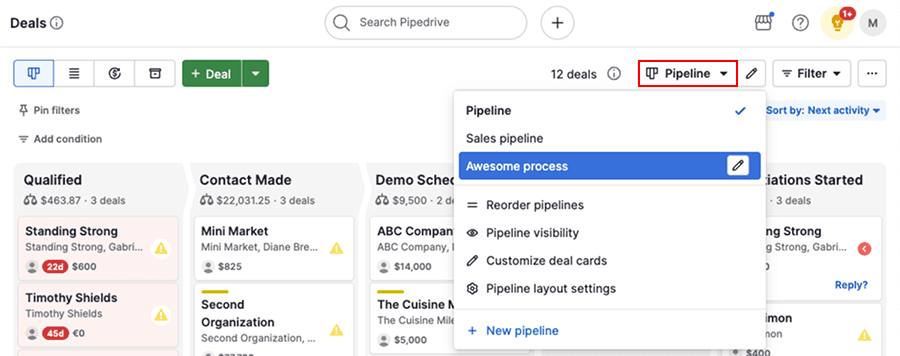
Pipedrive documents the core pieces needed to track an inquiry from first contact through follow-up: a visual pipeline, customizable stages and fields, activity tracking, deal cards, filtering and sorting, workflow automation, and reporting. In the pipeline view, users can create deals, schedule and complete activities, review notes and email conversations, and move deals through stages until they are won or lost.
For a small service business, the biggest thing to verify is whether your real process fits Pipedrive’s deal model. Its help documentation explicitly says a deal can exist in only one pipeline at a time. You can move a deal to another pipeline, but Pipedrive also says deal-progress reports in Insights reflect movements only within the current pipeline. If your business needs separate downstream records for onboarding, support, or delivery while preserving one continuous reporting trail, that limitation deserves a direct pre-purchase test.
What Pipedrive documents for inquiry tracking and follow-up
The retained Pipedrive pages describe inquiry follow-up as a pipeline-driven process. The feature page says you can customize your pipeline with stages that match how your team sells, create custom fields, use multiple custom pipelines, track activities, automate workflows when deals reach certain stages, and analyze metrics such as number of deals, conversion rates, and bottlenecks.
The help article adds the day-to-day mechanics. In pipeline view, a deal card shows the title, contact, value, label, and owner by default. From the card, users can check upcoming activities, mark activities done, or schedule new ones. Opening the deal reveals activities, notes, email conversations, files, and documents. Deals can be filtered, sorted by next activity or other fields, and highlighted with the Rotting feature when they have not been updated recently.
Taken together, the documentation describes a workflow a service business can test: create a deal tied to a contact, assign next steps, move the deal through stages, and sort by activity to see what needs attention.
- Customizable pipelines, stages, and fields
- Multiple pipelines for different processes or teams
- Tasks and activities linked to deals and stages
- Deal cards with contact and ownership details
- Deal detail view with notes, emails, files, and documents
- Filters, sorting, and visibility controls
- Workflow automation triggered by stage changes
- Reporting on deal counts, conversion rates, and bottlenecks
When Pipedrive looks like a cleaner fit
Pipedrive looks best documented for a business that wants one active opportunity record to drive follow-up. If your office mostly needs to capture an inquiry, assign the next call or message, track notes and email history, move work through clear stages, and keep the team focused on the next activity, the documented workflow is straightforward.
Test this workflow when the same team handles intake, estimation, follow-up, and close. During evaluation, verify whether the pipeline view and activity filters surface the stale or neglected inquiry records managers need to review.
What to verify before choosing Pipedrive
The most important checks are about process design, not generic feature presence. Pipedrive documents plenty of follow-up tools, but a small service business should confirm whether those tools match how inquiries actually move across sales, scheduling, onboarding, and service work.
If your process crosses teams or departments, ask the vendor or test account setup to show exactly how records are handled after the initial inquiry stage. The selected Pipedrive help page says a deal can exist in only one pipeline at a time, and that moving it affects how deal-progress reporting appears in Insights. That matters if you expect one uninterrupted view from lead through later service steps.
Also verify exact edition access. The supplied pages support the documented capabilities, but they do not establish that every capability is included in every plan.
- Whether one active deal record is enough for your full inquiry-to-service process
- How handoffs between teams should work if the deal changes pipelines
- Whether your reporting needs depend on continuous stage history across multiple pipelines
- Whether non-sales follow-up steps should live as deals, tasks, or another process in your setup
- Which users need visibility to which pipelines and deals
- Which automations and integrations are included in the plan you would actually buy
- How email follow-up, notes, files, and documents should be used in your daily workflow
Why the handoff question matters in a comparison
The strongest comparison point in the supplied research is not that Pipedrive lacks follow-up tools. It is that the sample documents a different handoff model elsewhere. Bigin documents Connected Pipelines that can automatically create connected records in separate team pipelines when a record reaches a stage or condition. By contrast, Pipedrive’s help documentation says a deal can exist in only one pipeline at a time, though it may be moved to another pipeline.
For a buyer, that means the decision is less about which product mentions pipelines and more about which product’s documented record flow matches the business. If your follow-up process is mostly linear, Pipedrive may be easier to model. If your process regularly branches into separate downstream workstreams, the Pipedrive reporting boundary should be checked carefully against alternatives.
| Question to verify | What the supplied documentation supports |
|---|---|
| Can one inquiry stay as one active deal through follow-up? | Pipedrive documents deal-based pipeline tracking, stage movement, activities, notes, emails, files, and documents. |
| Can the record move to another pipeline? | Yes. Pipedrive documents that a deal may be moved to another pipeline. |
| Can the same deal exist in multiple pipelines at once? | No. Pipedrive documents that a deal can exist in only one pipeline at a time. |
| Will progress reporting span pipeline moves as one continuous trail? | Pipedrive documents that deal-progress reports in Insights reflect movements only within the current pipeline. |
| Is there documented automated creation of separate downstream records in this sample? | That behavior is documented for Bigin Connected Pipelines in the supplied comparison sample, not for Pipedrive in the selected pages. |
Practical decision guide for a small service business
Consider Pipedrive for deeper evaluation if you need inquiry and estimate records with ownership, scheduled next steps, and a pipeline view that surfaces stale inquiry records.
Pause and verify more carefully if your business treats the inquiry as the start of several separate but connected workflows, such as sales, onboarding, field delivery, and support, and you want those transitions reflected cleanly in reporting without relying on workarounds.
A sensible test is to map one real inquiry from first contact through quote, follow-up, close, and post-sale handoff. If your team can do that cleanly with one active deal and the reporting still answers your questions, Pipedrive may fit. If the process quickly requires separate downstream records or cross-team pipeline logic, ask for a demonstration of that exact scenario before committing.
Limitations & context
What does Pipedrive document for tracking an inquiry through follow-up, and what should a small service business verify before choosing it?
- This review uses selected vendor documentation, not hands-on product testing or independent outcome data.
- The supplied Pipedrive evidence is strongest on deal and pipeline management, not on a fully demonstrated end-to-end service workflow beyond sales.
- Plan-specific availability was not fully verified from these pages; confirm the exact edition, add-ons, and integrations before buying.
- Where the selected pages do not address a detail, that is unknown here and should not be treated as proof that the feature is absent.
- Comparison points about other vendors reflect only the supplied documentation sample and should not be treated as market-wide rankings.
3 source records
- Bigin Connected Pipelines: vendor feature documentationwww.bigin.com Captured
- Pipedrive pipeline management: vendor feature documentationwww.pipedrive.com Captured
- Pipedrive pipeline view: vendor help documentationsupport.pipedrive.com Captured