
Choose HubSpot, Bigin or Pipedrive for inquiry follow-up
A concise shortlist for business owners comparing documented inquiry tracking, handoffs and follow-up workflows in HubSpot, Bigin and Pipedrive.
Shortlist overview
The short answer
Shortlist HubSpot if you want broad documented coverage across contact records, tasks, deals, inbox, ticketing and reporting in one connected CRM. Shortlist Bigin if your biggest need is handing work from sales to onboarding or support across separate pipelines, because the supplied documentation is most explicit about multi-team pipelines and connected record creation. Shortlist Pipedrive if you want a sales-centered pipeline with detailed day-to-day deal management, activity visibility, filtering and workflow controls. The clearest documented difference in this evidence set is handoff design: Bigin documents automated creation of connected records in separate pipelines, while Pipedrive documents that a deal exists in only one pipeline at a time.
This comparison uses selected vendor documentation, not independent hands-on testing.
Bottom line for a small service business
All three products document the basics needed to track incoming inquiries and follow-up work: records, pipeline stages, activities or tasks, and visibility into progress. The useful choice is less about whether a CRM has a pipeline and more about which workflow shape matches your business.
HubSpot is the broadest documented option in this sample for keeping inquiry follow-up, contact history, shared conversations and service issues in one system. Bigin is the most explicit here about running separate pipelines for multiple customer-facing teams and linking handoffs between them. Pipedrive is the clearest fit in this sample if you want a structured, sales-first deal pipeline with strong day-to-day pipeline-view controls.
- Choose HubSpot for breadth across contact management, deals, tasks, inbox, ticketing and reporting.
- Choose Bigin for multi-team handoffs across sales, onboarding and support pipelines.
- Choose Pipedrive for focused pipeline execution and deal-by-deal follow-up management.
5 supporting sources
What each vendor documents for inquiry tracking and follow-up
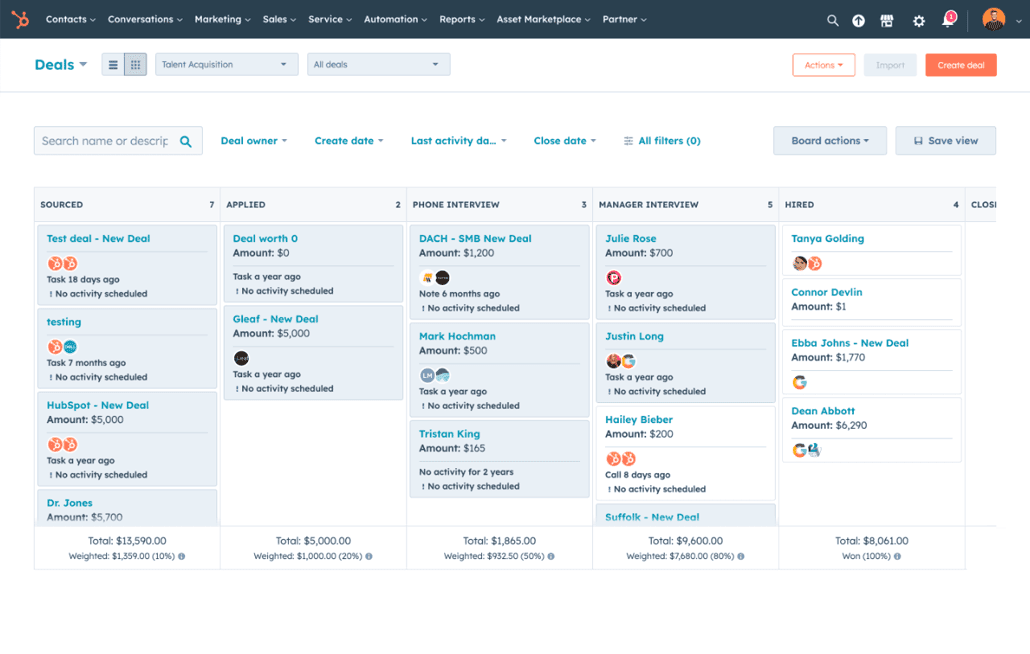
HubSpot documents contact management, communication history, deals, task and activity tracking, pipeline management, reporting dashboards, shared inbox, ticketing, meeting scheduling, email tracking and email templates. Its pipeline page also documents customizable deal stages, drag-and-drop movement, task assignment, and creating deals directly from contact or company records with current information filled in.
Bigin documents team pipelines and sub-pipelines for different customer-facing operations, with examples that include sales, onboarding and support. The supplied pages also document operation-specific records, permissions by team pipeline, AI-generated record summaries, and Connected Pipelines that create connected records in separate pipelines when a stage or condition is reached.
Pipedrive documents customizable pipelines and stages, activity tracking, workflow automation, reporting, integrations and multiple pipeline views. Its help documentation adds practical detail: deal cards can show key fields, upcoming activities can be checked from the card, full deal details can include activities, notes, emails, files and documents, and users can filter, sort and manage visibility.
| Product | Documented strengths in this sample | Best shortlist reason |
|---|---|---|
| HubSpot | Contacts, communication history, deals, tasks, reporting, shared inbox, ticketing, meeting scheduling, email tracking, drag-and-drop pipeline stages | You want one broad CRM for inquiry follow-up plus service visibility |
| Bigin | Separate team pipelines, sub-pipelines, operation-specific records, permissions, connected records across pipelines | You need structured handoffs between teams after the initial inquiry |
| Pipedrive | Custom pipelines, activity tracking, workflow automation, filtering, sorting, deal cards and detailed pipeline view behavior | You want disciplined sales follow-up inside a focused pipeline workflow |
6 supporting sources
- [1] HubSpot Free CRM: vendor product documentation
- [2] Bigin Team Pipelines: vendor feature documentation
- [3] Bigin Connected Pipelines: vendor feature documentation
- [4] Pipedrive pipeline management: vendor feature documentation
- [5] Pipedrive pipeline view: vendor help documentation
- [6] HubSpot pipeline management: vendor feature documentation
The biggest difference is how handoffs are documented
If your inquiry process continues across teams, the strongest documented distinction in this evidence set is between Bigin and Pipedrive. Bigin documents Connected Pipelines that can automatically create connected records in separate team pipelines when a record reaches a stage or meets a condition. That supports a workflow where a sale, qualification or support event starts downstream work without relying on one shared deal record.
Pipedrive's help documentation is explicit that a deal can exist in only one pipeline at a time, although it can be moved to another pipeline. It also notes that deal-progress reporting in Insights reflects movements only within the current pipeline. For an owner comparing options, that makes Pipedrive a clearer fit for managing one active deal path, while Bigin is more directly documented for separate but linked team workflows.
HubSpot's supplied pages support pipeline stages, task assignment, record-linked deal creation, shared inbox and ticketing, which may be enough if your main need is to keep sales and service context in one CRM. But in this source set, Bigin is more explicit about automated cross-pipeline handoffs.
- Bigin documents connected record creation between separate pipelines.
- Pipedrive documents one-pipeline-at-a-time deal existence.
- HubSpot documents broader connected CRM tools, but this sample is less explicit about cross-pipeline handoff mechanics than Bigin.
How to build your shortlist quickly
Put HubSpot on your shortlist when you want to replace spreadsheets or disconnected tools with a broader CRM that documents inquiry records, activities, email follow-up, meetings, shared conversations, tickets and dashboards in one place. That makes HubSpot a candidate to test when different people need shared customer context.
Put Bigin on your shortlist when your work regularly moves from inquiry to another team, such as onboarding, delivery or support. The supplied documentation is the clearest on separate pipelines for different operations, sub-pipelines within them, and automation that starts downstream records.
Put Pipedrive on your shortlist when your process is mainly about moving deals through a disciplined follow-up sequence. Its supplied help content gives the most concrete operational detail on what reps or owners can see and act on from the pipeline view day to day.
- Shortlist HubSpot if you want breadth and a unified customer record.
- Shortlist Bigin if handoffs between teams are central to your process.
- Shortlist Pipedrive if your main problem is consistent sales follow-up inside one deal flow.
Questions to verify before you buy
The supplied evidence is strong enough to shortlist these products, but not to confirm the exact edition, setup effort or long-term fit for your business. Use a demo or trial to verify the workflow that matters most to you.
Treat these as practical checks. They are proposed evaluation tests, not completed experiments.
- Can every new inquiry be turned into a trackable record with owner, next step and due date?
- Can follow-up tasks, emails or meetings be scheduled directly from the record you will actually use every day?
- If work moves to onboarding or support, do you want the same record to move stages or a new linked record to be created?
- What can each user see and edit by pipeline, deal or team?
- Which inbox, email, calendar and other integrations are included in the edition you would buy?
- How does reporting handle work that changes pipeline or team ownership?
Limitations & context
How can you shortlist HubSpot, Bigin and Pipedrive for inquiry tracking and follow-up using their documented capabilities?
- This comparison uses selected vendor documentation, not independent hands-on testing.
- The evidence supports documented capabilities only; it does not prove usability, reliability, service quality or business outcomes.
- Plan and pricing details were not fully verified for the exact editions a small service business might buy.
- Missing details in these pages are unknown, not proof that a product lacks a feature.
- No independent migration, support-quality or implementation-time comparison was supplied.
- No measured demand or observed search-question evidence was supplied for this exact topic.
6 source records
- HubSpot Free CRM: vendor product documentationwww.hubspot.com Captured
- Bigin Team Pipelines: vendor feature documentationwww.bigin.com Captured
- Bigin Connected Pipelines: vendor feature documentationwww.bigin.com Captured
- Pipedrive pipeline management: vendor feature documentationwww.pipedrive.com Captured
- Pipedrive pipeline view: vendor help documentationsupport.pipedrive.com Captured
- HubSpot pipeline management: vendor feature documentationwww.hubspot.com Captured